


Dell AI Enterprise Infrastructure Platform
A North Star concept for how Dell’s enterprise IT admins could monitor, diagnose, and act on infrastructure through one unified, AI-native workspace. My UT Austin MSIS capstone with Dell Technologies.
Overview
Type
MSIS Capstone, Professional Experience Project
Date
Spring 2026
Role
Sole Product Designer
Tools
Figma, Figma Make, Claude Code, ChatGPT, Gemini, Replit, Bolt.new, v0
The Problem
Enterprise IT admins managing Dell’s infrastructure (servers, storage, networking) work across 5 to 10+ disconnected tools just to understand a single issue. Monitoring, incidents, and diagnostics all live in separate systems, with no unified view of system health or history.
That fragmentation slows down the decisions that matter most. Knowledge is scattered across tools and teams, incident response takes longer than it should, and admins fall back on manual investigation instead of getting a fast, trustworthy answer.
Dell doesn’t currently own that day-to-day operations experience, and nothing connects monitoring, diagnosis, and collaboration into one system, let alone gives admins AI support for predicting or simulating outcomes before they happen.
The Opportunity
Admins need a trusted way to understand their systems, investigate changes, and act safely, with AI that explains issues, predicts risk, and suggests next steps, while keeping the human in control of the final decision.
My Role + Approach
Role
I was the sole designer on this project, working directly 1:1 with a Senior Principal UX Engineer at Dell as my field supervisor. Rather than executing a defined spec, I was asked to shape product direction from an ambiguous concept.
- Sole designer working 1:1 with a Senior Principal UX Engineer
- Shaped product direction from an ambiguous concept
- Designed and prototyped a North Star experience, not a shippable MVP
Approach
Early on I made a deliberate bet: treat AI tools as the primary design medium, not just a speed boost bolted onto a traditional process.
- Replaced low-fidelity ideation with parallel high-fidelity exploration
- Generated and synthesized concepts across 8 different AI tools
- Built directly in an interactive prototype instead of static comps
The workflow behind it
Part of what made that possible was a custom integration a Dell colleague built that let an AI coding assistant design directly onto our shared Figma files, instead of the usual round-trip of generating HTML, downloading it, and re-importing it into Figma by hand.
Process
I planned the semester across six phases, from initial orientation through a final demo to Dell’s architecture team.
- Align & Set Guardrails: confirm scope, NDA boundaries, and expectations
- Research & Pattern Review: review AI and enterprise UI patterns
- Explore Concepts: sketch multiple interaction models
- Design & Prototype: build interactive prototypes
- Refine & Validate: incorporate feedback and finalize the design direction
- Demo & Wrap: prepare the demo-ready experience
Competitive Research
Before proposing anything new, I wanted to build credibility and design intuition grounded in real precedent, not reinvent things that already existed. I used Mobbin and ran a landscape analysis across generative-AI and hybrid chat-and-canvas interfaces, breaking down patterns for:
- Multi-agent collaboration
- Trust and explainability
- Where Dell's own system was missing basic building blocks
The AI Crazy Eights
For ideation, I adapted the classic Crazy Eights exercise for an AI-native process: instead of 8 rough sketches in 8 minutes, I wrote one refined prompt and ran it, unmodified, across 8 different AI tools: Claude, Figma Make, Lovable, ChatGPT, Google Gemini, Replit, Bolt.new, and v0, over about 4 days. Crazy Eights is traditionally time-boxed, but this still felt like the same family of exercise: fast, high-fidelity, fully interactive comps rather than rough sketches. With so much competitor precedent already out there, inventing something from a blank page didn’t feel necessary.

Comparing all 8 outputs side by side surfaced specific patterns worth carrying forward:
- A rounded “card” treatment for AI responses instead of a flat panel
- A detachable multi-tab console
- An @-mention people-picker with hover cards
- A canvas-click detail overlay
I then synthesized these into a single direction rather than picking one tool’s output wholesale.
From there I iterated directly inside an interactive prototype, not static comps, refining across roughly 200 versions before the final demo.
Key Decisions
Three decisions ended up shaping the direction of the product more than any single screen.
1. Designing for teams, not individuals
2. Betting on AI, in the product and in the process
3. Flipping the information architecture
Solution
The result is a collaborative AI operations platform for managing infrastructure, not a chatbot bolted onto a dashboard, but a system built around five core capabilities.
- Real-time visibility across environments, incidents, and system health
- An interactive timeline with playback and simulation of past and hypothetical incidents
- AI-assisted decision-making embedded directly in workflows, not a separate tool
- Multi-user collaboration with shared context, files, and actions
- Configurable AI agents with their own roles, permissions, and responsibilities
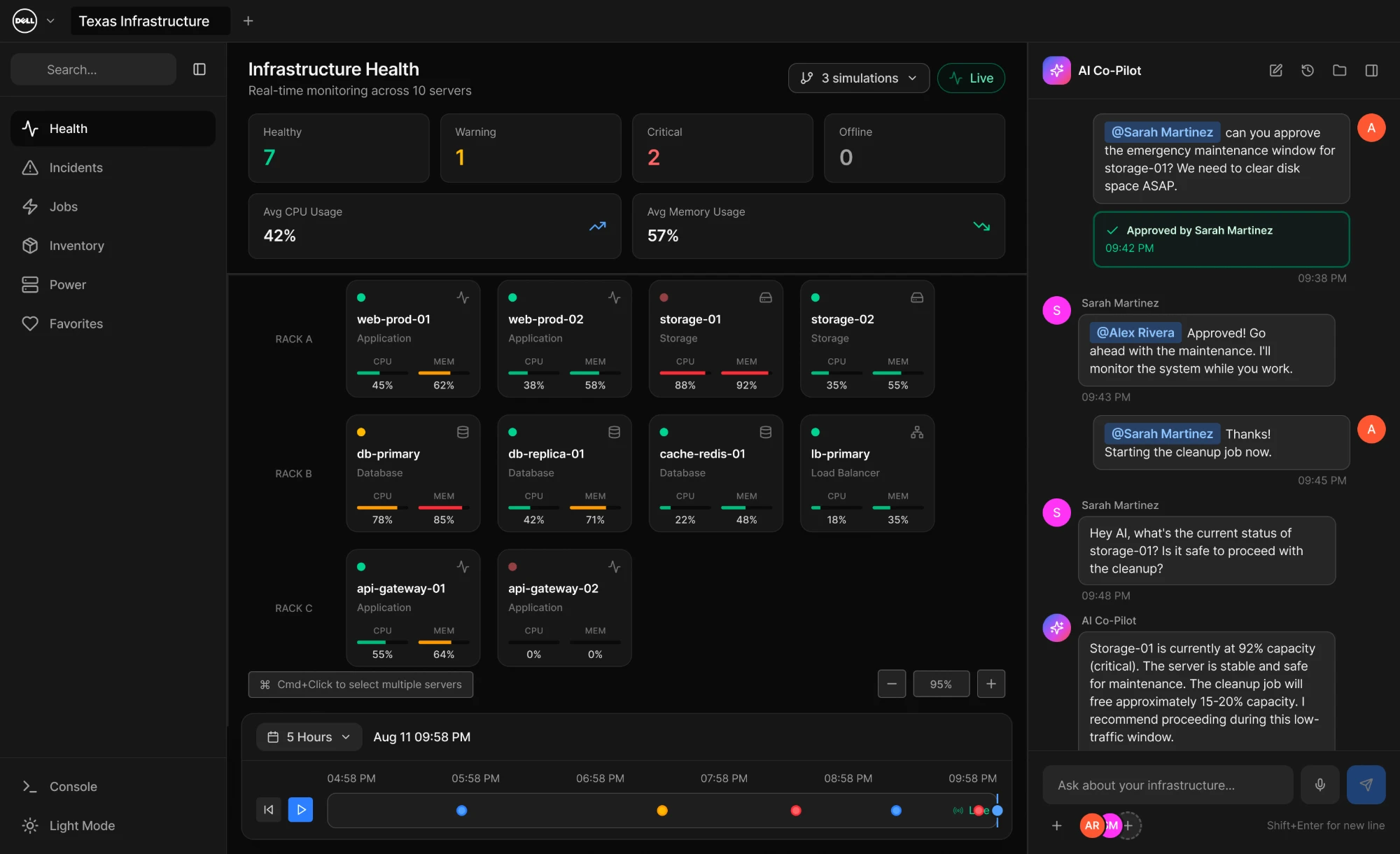
The Infrastructure Health dashboard in motion
Simulation and branching
One feature stood out as the centerpiece of the whole concept: treating infrastructure history like a version-control branch. Instead of only reacting live, admins can scrub back through history, then fork a simulation off any point in time to test “what if we did X” without touching the live system, then merge or discard it afterward.
Scrubbing the timeline and branching a simulation off a past point in time
Collaboration and human-in-the-loop approval
Admins rarely work alone, and increasingly they’re working alongside AI agents, not just teammates. The platform treats both the same way: shared context, shared files, and shared actions, with the AI proposing and the human approving before anything touches live infrastructure.
Multi-user collaboration with AI agents, including human-in-the-loop approval
Impact
How this changes the way teams operate:
- From fragmented tools → a unified operational workspace
- From reactive monitoring → proactive simulation and planning
- From individual decisions → collaborative, AI-assisted workflows
- Faster, more confident incident response and recovery
- Scalable operations enabled by AI-assisted workflows
Outcome
This work became a North Star concept for Dell’s future product direction. I presented it to:
- Dell's architecture team, for feedback
- Core Dell stakeholders, as a proof of concept
- My UT Austin MSIS capstone class
- Dell's Enterprise Design Group
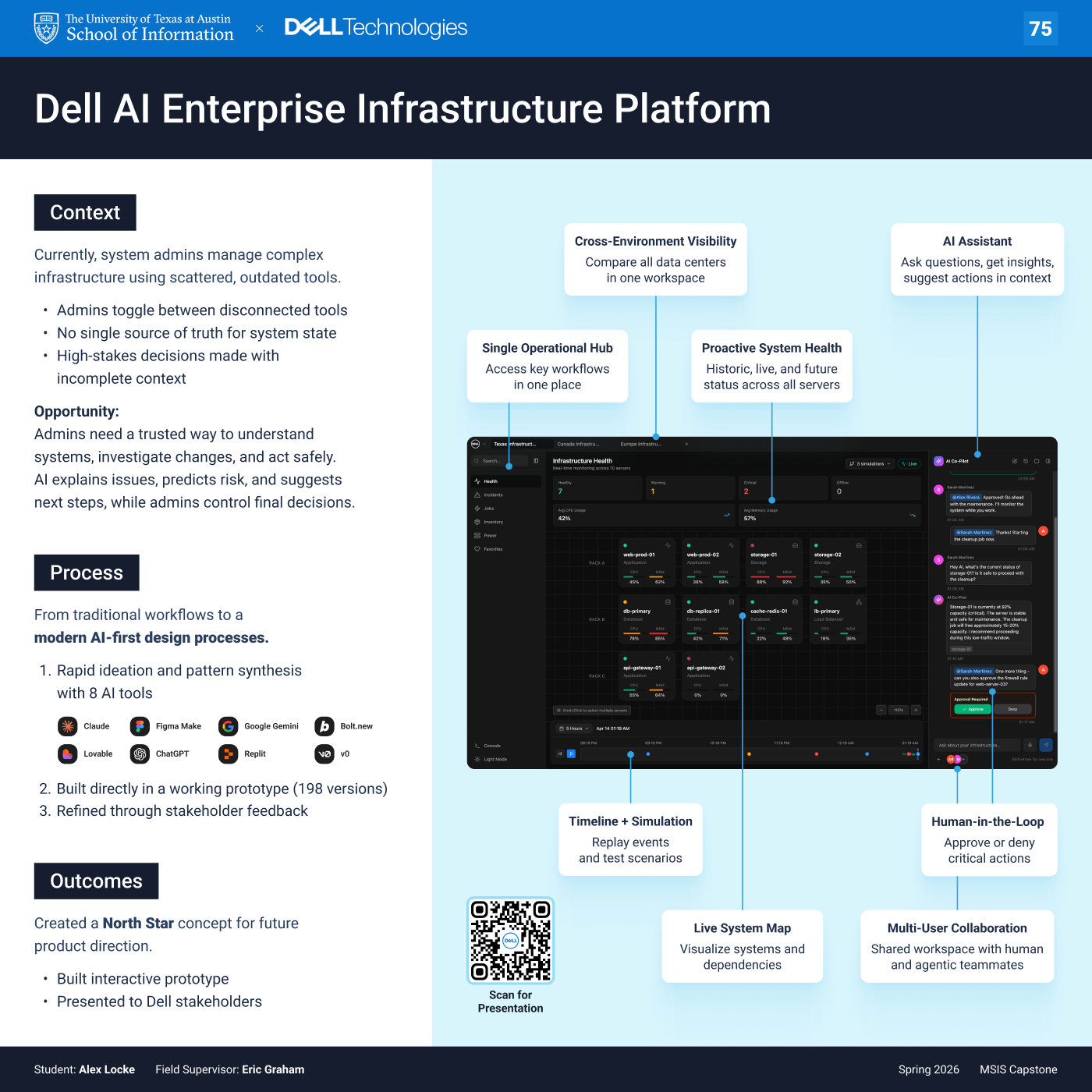
Final capstone poster, presented at UT Austin's iSchool Capstone Poster Session, April 2026
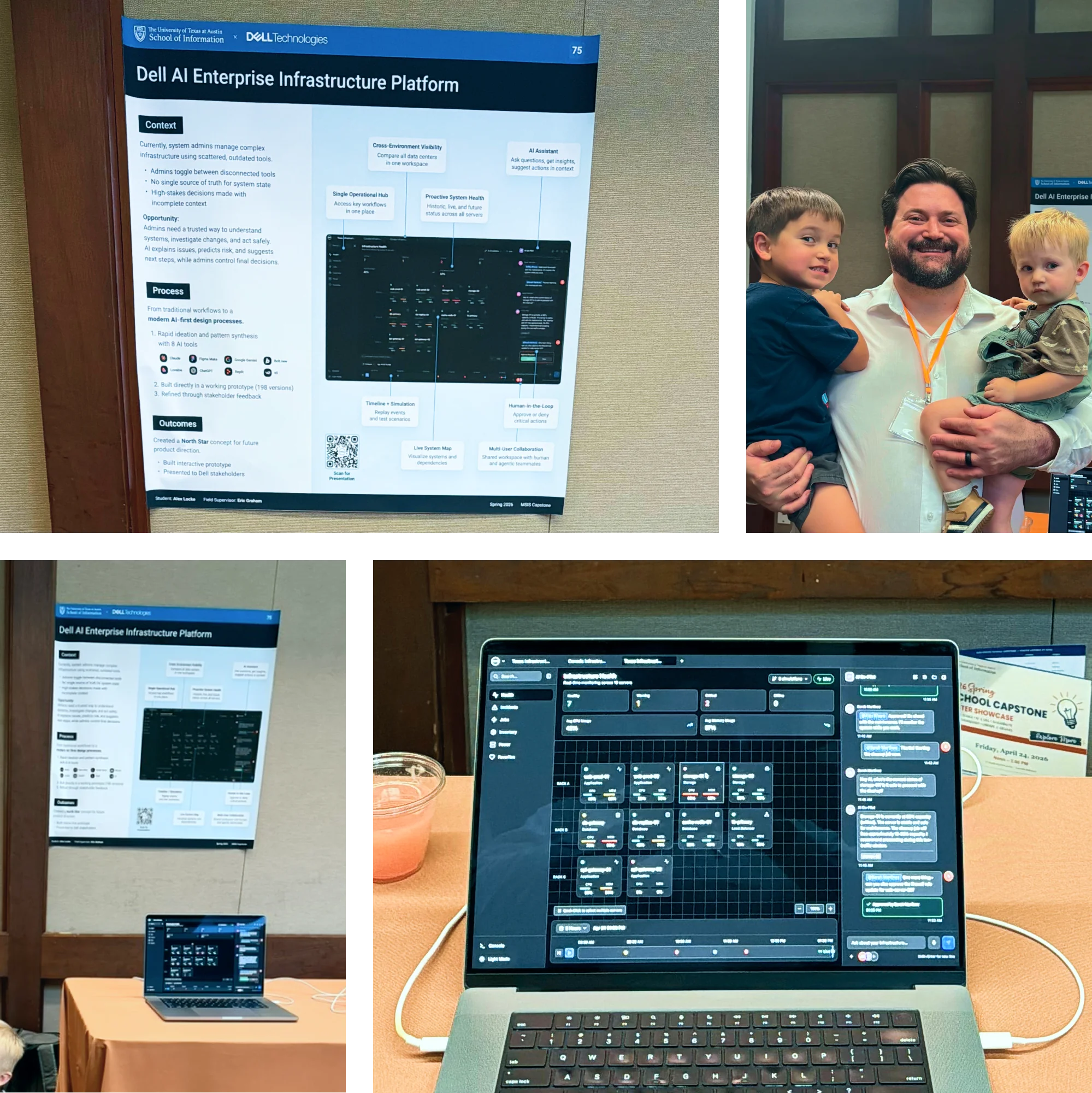
Poster session, April 2026
A few months after the capstone wrapped, my field supervisor sent me a link to Dell’s Agentic AI Platform, a public product for building, running, and governing AI agents as observable, permissioned services rather than a single chatbot. This isn’t just a similar idea landing in the same space, he confirmed it’s the actual project I worked on, shipped two weeks earlier as the v1 release, with the MVP scope trimmed down from the full North Star concept. Seeing something I designed go from a semester-long concept to a real product Dell customers can buy, agents as governed, accountable teammates, is the most validating outcome I could have asked for from a capstone.
Reflection
Working this way for a full semester surfaced a question I didn’t expect to sit with: if AI tools compress weeks of wireframing and comps into days, what’s actually left for the designer to do? At one point, after getting a fully interactive prototype working in about a week, I genuinely felt like I was cheating. The answer I landed on, with some pushing from my field supervisor: a chef using a food processor is still a chef. AI replaces the manual execution, not the taste. Two designers using the exact same 8 tools on the exact same prompt will still produce meaningfully different output, because the judgment (what to keep, what to cut, what structure actually matches how people think) is still entirely human.
That question got tested for real a few weeks later, when someone pushed hard on whether AI-assisted concepting counts as real design craft. It clarified something: the part of this job AI can’t touch isn’t the pixels, it’s deciding what the right structure even is, which is exactly what the information architecture pivot above ended up proving. The clearest evidence is what I ended up spending my time on: not fixing corner radii or picking the fourth shade of blue, but strategy, the Crazy Eights methodology, the timeline-and-simulation concept, the information architecture fix.
This was the project that taught me the most about what a designer’s job actually is once execution gets cheap. If I kept going, next steps would be validating with real operators, expanding the simulation and scenario modeling, introducing additional system views, and aligning with Dell’s design system for production readiness.
If you want to talk through the process, the tooling, or the information architecture fix in more depth, reach out via my contact page.